
Marketers and Developers, Can We Understand Each Other?

Historically Sitecore developers have enjoyed a relative monopoly on understanding Sitecore terminology and practices. Through its history as a Content Management System, already well-known terms were used and developers and business users alike were able to easily understand their common meaning. Terms like ‘workflow’, ‘security roles’, ‘templates’ etc were typically the domain of developers and little to no communication was required to translate these terms into the business domain, and there is little room for ambiguity in these terms.

With Sitecore’s growth into a Customer Experience Platform, this has changed with its expansion into the world of marketing and its associated (and ever growing) terminology. Now developers are tasked with working with marketers to help create campaigns, track interactions and sessions, manage goals and outcomes, and all of the little bits in between. Marketers likewise need to be able to communicate their requirements to developers, without having to explain the intricacies of their day to day jobs. Perhaps an even larger issue is the coming together of these two different worlds, and a dependency between them to ensure business value is being delivered.

The Sitecore UK Marketing Team recently ran a survey to look at some of the communication challenges faced between Marketers and Developers, which attracted over 150 responses. As might be expected, the survey highlighted a huge gap between developers and marketers, with an overwhelming 95% of respondents stating that they are struggling to bridge these differences. Perhaps more surprisingly, 85% of Marketers, and 95% of developers expressed frustration in working with developers and marketers respectively. This indicates a huge issue that can be causing frustration in development, misinterpreted requirements, and ultimately a reduction in the business value being delivered by both groups. Indeed, the differences can descend into vitriol and cyniscm between the groups, with each of them viewing the other as supercilious or arrogant and detrimental to delivery.
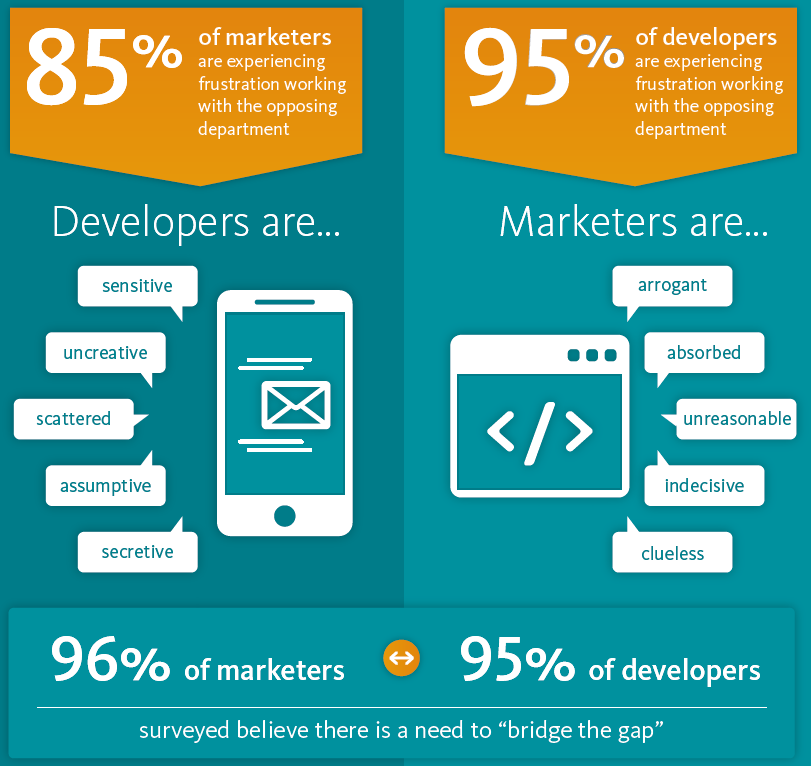
What Marketers and Developers think of each other

What Marketers and Developers think of each other

Here are some of the more eye-opening comments from the respondents (the survey was anonymous for the safety of everyone involved 🙂 –

From Developers:

  • Self-importance, arrogant superiority
  • speak in riddles, have no clue or understand about web systems, technology

From Marketers:

  • Can be a sensitive bunch, easily misunderstood
  • The penny dropping takes too long – they are the experts – all hail developers 😉

What is causing the friction?

The clear message from the survey is that a lack of communication makes it difficult for both groups to understand the other. From a marketers perspective, developers can favour the application of technology over its actual use to the customer, and can be secretive and less communicative than the average marketer. On the other hand, developers often feel marketers lack the technical knowledge they should, and tend to view things as much simpler than they actually are. For instance, a common theme among developers was that marketers tend to request features present on sites like Google and Facebook, and expect these to be simple additions.

To add to the complexity, the terminology between the groups is very different, which leads to confusion and misinterpretation. This can lead to added effort within any development, and in some cases can lead to even worse.

Misunderstanding

How can this be improved?

This issue is not new within software development. Issues like this have existed for years between software teams and the business. The issue arises from a lack of communication between the teams, which leads to developers having to make assumptions and interpretations from a given set of requirements. Likewise, since the business does not communicate with development teams except through a given set of requirements, they have no understanding of what’s actually involved. Therefore, all they would see is a requirement taking longer than it should (or longer than they think it should). A lack of communication during this process inevitably leads to lots of finger pointing when things don’t go to plan.

Recently, this issue has been rectified through the introduction of new Agile methodologies, and the idea of multi-disciplined self-organised teams. Using this method, marketers and developers should ideally be within the same team, aligned to a particular business domain (such as product or sales). Agile development and project management methodologies advocate collaboration and communication over process and documentation. This seems to be the answer to ensuring that marketers and developers can actually sit and speak about requirements, and crucially things can be tested quickly to see if they work.

Of course this is a huge topic and a big organisational change if your company isn’t already doing it, and doing this with Sitecore also brings its own considerations. Look out for my forthcoming blog post about organisation structures to support development. In the meantime I would highly encourage anyone to look into agile processes if they aren’t being done already: http://www.agilealliance.org/the-alliance/the-agile-manifesto/

Improve the Little Things

There are many more things that can be done as quick wins to start to bridge the gap;

Developers

  • Ensure you speak to marketers for clarification of requirements where necessary
  • Take time to teach them the platform and it’s uses
  • Don’t assume knowledge
  • Lean on architects to translate concepts between domains, including creating a common ontology
  • Don’t try and contain knowledge, openly share knowledge and aim to educate others
  • Bury your ego

Marketers

  • Be aware of differing personalities and adapt your approach to suit (getting an organisation to use something like Myers-Briggs profiling really helps here)
  • Involve developers in your ideation process
  • Get developer feedback in your planning/scoping activities
  • Ask for explanation’s where necessary and ensure developers are made aware if you don’t understand something

Ultimately if communication is improved, then both groups will have a greater understanding of the others activities, and new developments will be quicker and less prone to bugs. Clear communication will also reveal that both groups are actually not as far apart as you think, as evidenced by the survey.

How Marketers and Developers Evaluate Tasks

How Marketers and Developers Evaluate Tasks

What can Sitecore do?

Sitecore as a platform needs to cater to both developers and marketers, with the intention that both groups will be working on the platform in collaboration. Of course depending on how you approach development this may not be the case, but there are some things that every Sitecore developmer should insist on to aid understanding between groups;

  • Ensure a common ontology for the core parts of your solution
  • Utilise the Sitecore 8 Marketing Taxonomies to categorise marketing activities
  • Use display names with associated validation to ensure friendly naming of items
  • Develop SPEAK applications to cater for common business processes, simplifying them to the essentials of the process

What do you think, and what challenges you are facing in your teams? I’m Especially interested in hearing how you may have overcome these issues as well.

Sitecore DMS: Register a Goal Against Any Page

This is a quick tip for allowing a single service (Web Api Controller, MVC Route etc) to programmatically register goals against any page.

Typically when using the Sitecore DMS to register goals through code, the most common approach is to use the Tracker class to register a goal on the current page, as such;

        //Create the record that needs to be stored (the goal)
        VisitorDataSet.PageEventsRow pageEventsRow = Tracker.CurrentPage.Register(goal);

        //Add any data you like, which will be stored with the PageEvent
        pageEventsRow.Data = eventMessage;
        pageEventsRow.ItemId = goalItem.ID.ToGuid();

        //Submit the goal
        Tracker.Submit();

The issue with this is that it registers a goal against the current page only.

In some scenarios you may wish to register goals against other pages. For instance if you would like to set up a generic MVC/Web API route to register a goal from client side, accepting any page.

To do this, you can use the PagesRow class (the class type for the Tracker.CurrentPage object) from the VisitorDataSet to register the goal.

       //Getting the current page into PagesRow 
        VisitorDataSet.PagesRow page = Tracker.Visitor.CurrentVisit.CurrentPage;

        //Override items as required
        page.ItemId = tmpItemId.ToGuid();
        page.PageId = tmpItemId.ToGuid();
        page.Url = "/Articles/Custom-Field-for-Task-Schedule";

        var pageEventData = new PageEventData(goalName)
        {

               ItemId = tmpItemId.ToGuid(),
               DataKey = goalName,
               Data = "/Articles/Custom-Field-for-Task-Schedule",
               Text = targetItem.Name
        };

        //Register via page
        page.Register(pageEventData);

This example uses the CurrentPage object to instantiate a PagesRow object, which is then overridden with the required values. I then create a standard MVC route to this method. My example looks like this;

     routes.MapRoute(
            "RecordGoal", // Route name
            "rest/goal/{goalName}/{itemId}", // URL with parameters
            new
            {
                action = "RecordGoal",
                controller = "MarkettingService",
            });

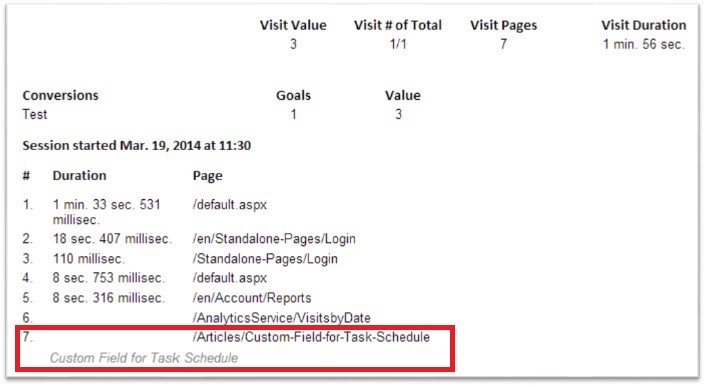
I can now call this route from any page client side, and simply pass the goal name and the page I wish to register it against. Now in the Latest Visits report, I can see my goal recorded against the correct page:

Analytics Report

Sitecore: Grouping Publishing Targets

This post is to provide a simple tool to cover an admittedly rare scenario, or at least currently rare. This scenario came about after working with a global Sitecore customer to design an architecture that covered the customers global footprint. The architecture allowed for multiple Content Delivery (CD) servers within each region for availability/redundancy purposes.

World Architecture

When designing this architecture, it became evident that there would be lots of different publishing targets created, which would become an annoyance to Content Editors, and also bring about the possibility of publishing targets being left unchecked. Editors in Asia however still needed to be able to publish to the Asian CD’s and not necessarily to other CD servers. With the above, the publishing dialog looked something like this;

Publish Dialog Before

The simple solution to this is to allow grouping of the publishing targets into logical groups, such as Asia; Europe; US etc. To achieve this is easy, and involved the following steps;

  1. Create a new template type to represent Publishing Groups. This contains a single multi-list for selecting publishing targets that it will represent.
  2. Create a folder to contain your publishing groups.
  3. Create the groups that you want to use, and add the relevant publishing targets into each.
  4. Override the ‘Publish.xml’ dialog to add in a new frame for publish groups
  5. Create your own class to sit behind the dialog form;
  6. Where publishing groups exist, then use those in place of publishing targets, else use Publishing Targets in the normal way

In the infamous words of Blue Peter, here is one I have made earlier: https://marketplace.sitecore.net/Modules/Sitecore_Publishing_Target_Groups.aspx

You can also find the source here: https://github.com/brooksyd2/sitecorepublishgroups

Once installed, this module will allow you to set up publishing groups to represent many publishing targets;

Add Group

This will then feed into the publishing dialog as below;

Dialog

This can be further refined through default publishing groups, settable in the same way as default publishing targets.

As stated in the beginning, a simple solution to a rare problem, but one I hope will help someone else in future.

Related Module: https://marketplace.sitecore.net/Modules/Sitecore_Publishing_Target_Groups.aspx

Related Source: https://github.com/brooksyd2/sitecorepublishgroups

Sitecore DMS: Recognising Users Across Devices

This post looks at how DMS stores visitor records, and this can be manipulated so that returning visitors across devices can reuse the same Visitor records.

When a user visits your site for the first time, the Sitecore DMS will create a brand new Visitor record in the analytics database, and link this to a new Visit record. This visit record will be updated for the duration of that session with relevant information, such as pages visited, profiles triggered etc. Sitecore will also place two cookies onto the clients computer, one for the session, and a global cookie that will help Sitecore identify the visitor between sessions. These cookies are called

SC_ANALYTICS_SESSION_COOKIE, and SC_ANALYTICS_GLOBAL_COOKIE respectively.

Once the first visit has been registered, your Visits Table will look like this (obviously ignoring any previous visits):

VisitFirst

The VisitorId matches the new Visitor record created in the Visitors table, which will look something like this:

VisitorFirst

Once that session ends, then the visit will be closed (this is all handled via the VisitEnd pipeline, which is invoked by the SessionEnd pipeline). If the user then returns to the site, Sitecore will check for the SC_ANALYTICS_GLOBAL_COOKIE  cookie, and if found, will use the existing Visitor record to attribute to a new Visit Record.  So to simulate this, delete the existingSC_ANALYTICS_SESSION_COOKIE (shown through Chrome below);

Remove Cookie

Now when you refresh the site, Sitecore will not find a session cookie, and so will create a new visit. However, as it can find a Global cookie, it can detect who you are, and so the same VisitorId will be used as the previous visit.

SecondVisit

So this is great, Sitecore can now continue attributing visits to the same user so long as it can find the Global cookie. The Global cookie is set to expire 10 years in the future, so as long as the user does not delete that cookie, and continues to browse from the same device, then Sitecore will continue to recognise them.

However, if the user browses to the site from another device (mobile, different browser etc), then obviously the cookie won’t be there and Sitecore will create a new Visitor record. Assuming that the user hasn’t authenticated against the site (and so no Sitecore User exists for them) then there is unfortunately no way to detect that user on another device. What about when the user does log in or becomes known in some other way? Unfortunately Sitecore still does not recognise this as the same visitor, and so the new Visitor record will endure.

If you do want to use the same Visitor record however, then this is possible, so long as the user has registered (or in some way has a corresponding Sitecore User profile). When the user registers with the site a Sitecore User profile is created. Of course at this point you should also be using the ‘ExternalUser’ field to set the user name (or other identifiable attributes), which would allow you to query for the user across different visitor records as well.

Tracker.Visitor.ExternalUser = Sitecore.Context.GetUserName();

So once the user registers, the Visitor record will be updated as such:

Register

To allow Sitecore to recognise a returning authenticated user, and set the Visitor record appropriately, you simply need to recognise the visitor first, and then replace the automatically generated Session cookie with a new Session cookie containing the previous visitor details. To do this, within the Log In method for example, you can see if the user has an existing profile (using the user name), and if so set the cookie;

var visitor = VisitorManager.GetVisitorByExternalUser(domainUser);

if (visitor == null)

{

    Log.Info("First visit of " + domainUser, this);

}

else

{

    Log.Info("Returning visit of " + domainUser, this);

    if(visitor.VisitorId != Guid.Empty)

    {

        new VisitorKeyCookie().Create(visitor.VisitorId);

        new VisitCookie().Invalidate();

    }

}

With this method in place, when the user firsts visits your site from a different device, a new visitor record will be created to match their anonymous status (as they are not known at this point).

ReturnAnon

Once they log in however, a new Visit record will be created with the previous Visitor details set. This does mean that everything for the user post log in will be treated as a new visit, but using the previous VistorId.

Recognise
